Establish and Document Application Instance–Specific Information Wherever Instances Differ - Application Management Best Practices
Establish and Document Application Instance–Specific Information Wherever Instances Differ
(Chapter 100 of Application Management Best Practices)
Executive Summary: Chapter Overview
IF4ITThe Bottom Line
Core Concepts
| Concept | Definition & Strategic Role |
|---|---|
| Instance Differences | The ways an Application’s Instances diverge from one another, for example customer notifications sent only from Production, masked data in non-production Instances, or different purge periods by environment. Recording them explicitly in every documentation area where they exist keeps people working with non-production Instances from being misled. |
| Per-Instance Profile | A short profile maintained for each Application Instance that records its name and current Release, summarizes its differences, and links to the detail. It lets anyone working with a particular Instance quickly find everything that applies to it, and it is reviewed with every Release. |
| Currently Deployed Release | The Release running on each Instance, recorded in its per-Instance profile and updated with every Deployment, preferably automatically from Deployment records. It shows whether a fix has reached Production, which Instances are behind, and which version a reported problem was found in. |
Quick Q&A
Question: What happens when Application documentation describes only the Application in general or only its Production Instance?
Question: How should common information and Instance-specific information be organized within the Application Documentation?
Read More Below
This chapter explains how to capture the ways in which an Application’s Instances differ from one another, with explicit examples.
Why Instance Differences Must Be Captured
An Application has one Application Record and one body of documentation covering all of its Instances. But Instances are rarely identical. They differ in configuration, infrastructure, data, Integrations, security settings, and the Release they are running. If documentation describes only the Application in general, or only its Production Instance, people working with other Instances are misled, and differences between environments surface as failed Deployments, failed tests, and incidents.
Establish Instance-Specific Information
Capture, in every area of the documentation where Instances differ, what is specific to each Instance. Common areas and explicit examples include:
| Area | Example of an Instance Difference |
|---|---|
| Configuration | The Production Instance sends notifications to customers; test Instances send them only to an internal mailbox. |
| Build | A diagnostic logging module is compiled into development Builds but excluded from Production Builds. |
| Packaging | Packages for the region-specific Production Instances include different language resources. |
| Deployment | The Production Instance is deployed in a maintenance window with a staged rollout; test Instances are deployed continuously. |
| Instantiation | The Production Instance runs four load-balanced processes; the User Acceptance Testing Instance runs one. |
| Infrastructure | The Production Instance runs on dedicated high-availability infrastructure; the development Instance runs on shared infrastructure. |
| Data | The Production Instance holds real customer data; non-production Instances hold masked or synthetic data refreshed monthly. |
| Integrations | The Production Instance integrates with the live payment provider; test Instances integrate with the provider’s test service. |
| Security | Production requires multi-factor authentication for all users; development permits it to be bypassed for automated test accounts. |
| Monitoring and support | Production is monitored around the clock with on-call support; non-production is supported during business hours only. |
| Rules | Data is purged after seven years in Production, but after ninety days in test Instances. |
| Release | Production is running the previous Release while User Acceptance Testing is running the next one. |
These examples are illustrative; each Application will have its own differences.
Document and Share Instance-Specific Information
Record common information once, and record each Instance’s differences explicitly alongside it, so that anyone working with a particular Instance can quickly find everything that applies to it. Maintain a short per-Instance profile for each Instance that records its name and current Release, summarizes its differences, and links to the detail. Review Instance differences with every Release.
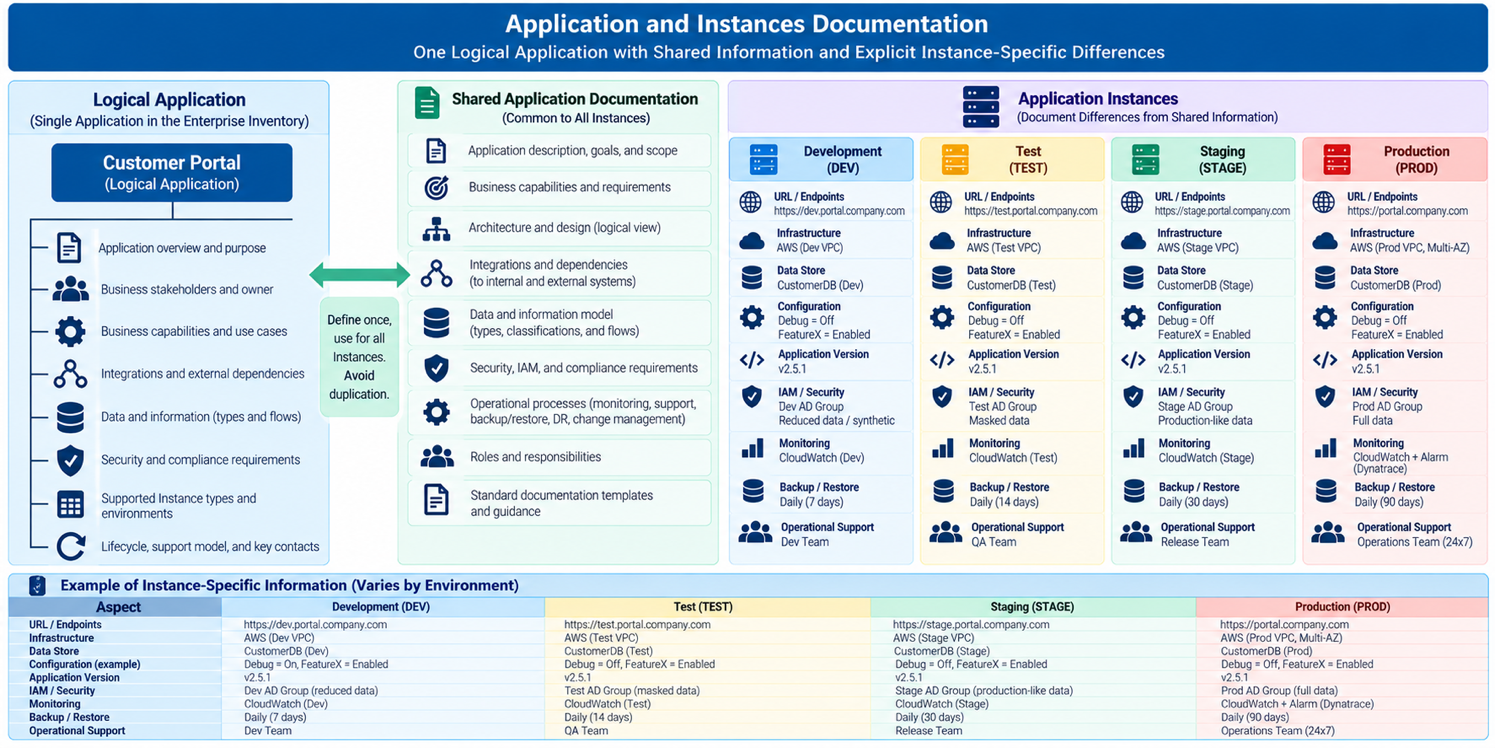
Best Practice: Establish and Document Application Instance–Specific Information Wherever Instances Differ
It is a best practice to both establish and document the solution for how an Application’s Instances differ: record what is common once, and record each Instance’s differences explicitly in every area where they exist, so that anyone can find what applies to a specific Instance.
Benefits: Explicit Instance differences prevent the surprises that cause failed Deployments and misleading test results, because everyone can see exactly how each environment differs from Production. They also make it safe to reason about one Instance without assuming it behaves like another.
Best Practice: Record the Release Currently Deployed to Each Instance
Record, in each Instance’s profile, the Release currently deployed to it, and update it with every Deployment, preferably automatically from Deployment records.
Benefits: Knowing which Release every Instance is running makes it immediately clear whether a fix has reached Production, which Instances are behind, and which version a reported problem was found in, eliminating a common source of confusion during testing and incidents.
Connections to Related IF4IT Practices and Inventories
The IT Operating Environments Best Practices addresses documenting and governing all known configuration differences between environments.
How to cite this page
When referencing this page in academic work, internal standards, or external publications, include the page title, IF4IT as author and publisher (The International Foundation for Information Technology (IF4IT), LLC), the URL, and your access date.
Example (informal web citation):
The International Foundation for Information Technology (IF4IT), LLC. Establish and Document Application Instance–Specific Information Wherever Instances Differ | Application Management Best Practices. https://if4it.org/best-practices/application-management-best-practices/establish-and-document-application-instance-specific-information-wherever-instances-differ/ (accessed 2026-10-30).
See About Us for content governance and site-wide citation guidance.
Copyright for The International Foundation for Information Technology (IF4IT), LLC: 2008 - Present
Legal Disclaimers