Establish and Document the Application's Monitoring, Observability, and Runbooks - Application Management Best Practices
Establish and Document the Application's Monitoring, Observability, and Runbooks
(Chapter 89 of Application Management Best Practices)
Executive Summary: Chapter Overview
IF4ITThe Bottom Line
Core Concepts
| Concept | Definition & Strategic Role |
|---|---|
| Observability | The metrics, logs, and traces that allow an Application’s problems to be diagnosed, not only detected. It complements monitoring of availability, performance, errors, resource usage, Integration health, scheduled jobs, and business-level indicators. |
| Audit Logging | Recording security-relevant and sensitive operations, such as logins, access changes, and changes to critical data, in a form that supports investigation and audit, retained according to the Application’s retention rules and regulatory obligations. |
| No Sensitive Data in Logs | The rule that Security Secrets and sensitive personal or regulated data must not be written to logs unless they are masked. It lets logging support investigations without creating new security exposure. |
| Runbooks | Documented instructions for routine operational tasks, such as starting and stopping the Application or running scheduled processes, and for alert responses explaining what each alert means and how to diagnose, resolve, or escalate it. |
Quick Q&A
Question: What should an alert-response runbook explain, and how should operators reach it?
Question: When should an Application's monitoring and runbooks be updated?
Read More Below
This chapter explains how to establish and document how an Application’s health is observed, what it logs, how alerts are handled, and how operational tasks are performed.
Establish Monitoring and Observability
Establish, with the Operations and Support Team(s) and the IT Application Owner:
What is monitored: availability, performance, errors, resource usage, Integration health, scheduled job outcomes, and business-level indicators such as transaction volumes.
Alerts: the thresholds that trigger alerts, their severity, and who receives them.
Dashboards: where the Application’s health can be seen at a glance.
Observability: the metrics, logs, and traces that allow problems to be diagnosed, not only detected.
Establish Logging and Audit Trails
Establish what the Application logs and how logs are managed:
Operational logging: what events are logged to support diagnosis, and at what level of detail.
Audit logging: the recording of security-relevant and sensitive operations, such as logins, access changes, and changes to critical data, in a form that supports investigation and audit.
Log retention: how long each kind of log is kept, consistent with the Application’s retention rules and regulatory obligations.
No sensitive data in logs: Security Secrets and sensitive personal or regulated data must not be written to logs unless they are masked.
Establish Runbooks
Create runbooks for the operational tasks the Application requires:
Routine tasks, such as starting and stopping the Application or running scheduled processes.
Alert responses, explaining for each alert what it means, how to diagnose it, and how to resolve or escalate it.
Document and Share Monitoring, Logging, and Runbooks
Record the design of the Application’s monitoring, alerting, logging, and audit trails in the Operational section of the Application Documentation, and publish its runbooks there, linked wherever possible from the alerts they address. Record Instance differences, such as reduced monitoring in non-production environments. Update monitoring and runbooks with every Release that changes the Application’s behavior, and after every incident that reveals a gap.
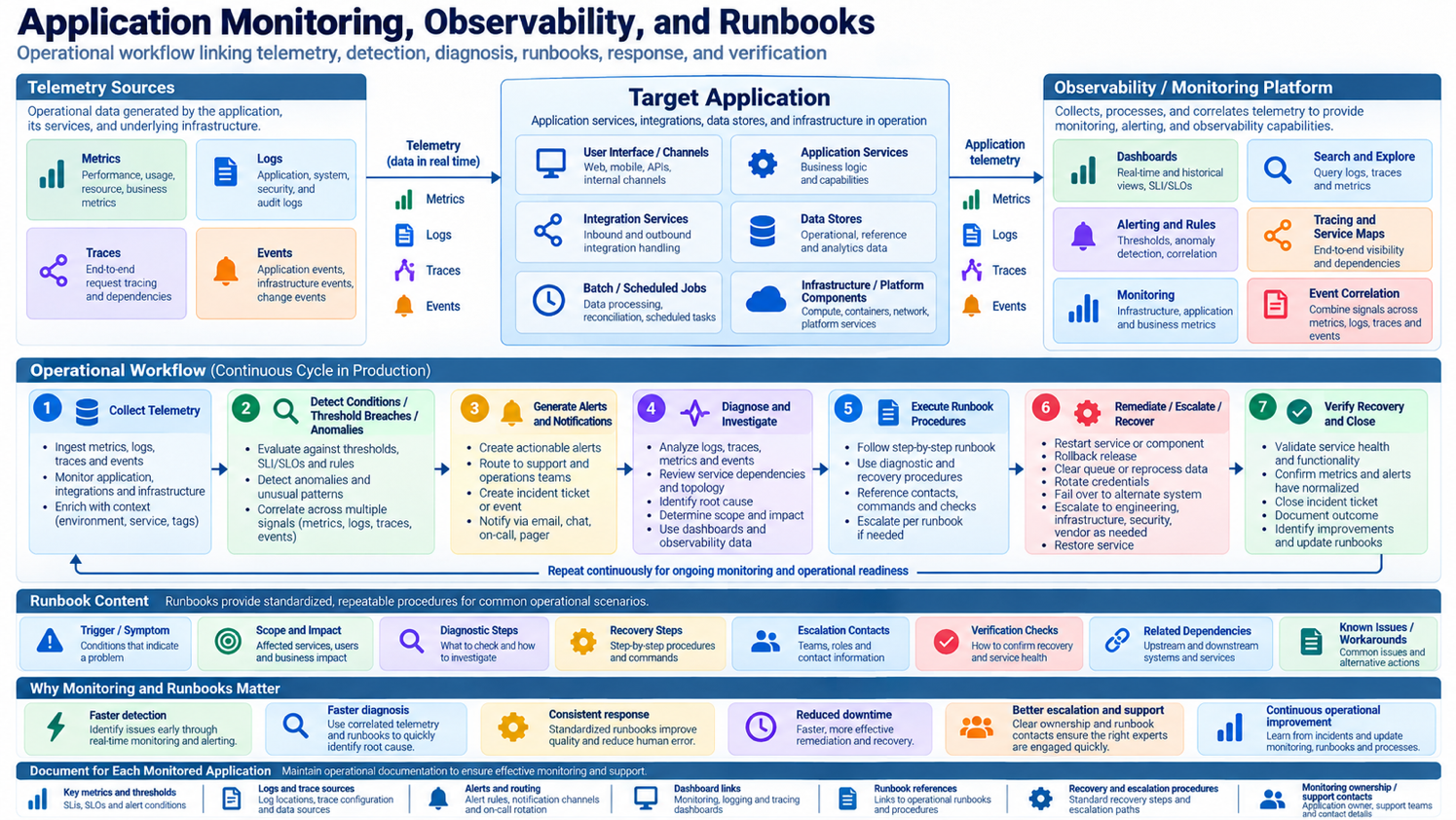
Best Practice: Establish and Document the Application’s Monitoring, Observability, and Runbooks
It is a best practice to both establish and document the solution for observing and operating an Application: define what is monitored and alerted on, how it is logged and audited, and how each alert and routine task is handled, and link runbooks directly to the alerts they address.
Benefits: Good monitoring and observability detect problems before users do and make their causes diagnosable, while runbooks let any trained operator respond correctly at any hour. Proper audit logging, with no sensitive data in logs, supports investigations and audits without creating new security exposure.
Connections to Related IF4IT Practices and Inventories
The IT Operating Environments Best Practices addresses monitoring and observing all governed environments. The Service Management Best Practices addresses event and incident management.
How to cite this page
When referencing this page in academic work, internal standards, or external publications, include the page title, IF4IT as author and publisher (The International Foundation for Information Technology (IF4IT), LLC), the URL, and your access date.
Example (informal web citation):
The International Foundation for Information Technology (IF4IT), LLC. Establish and Document the Application's Monitoring, Observability, and Runbooks | Application Management Best Practices. https://if4it.org/best-practices/application-management-best-practices/establish-and-document-the-application-s-monitoring-observability-and-runbooks/ (accessed 2026-10-30).
See About Us for content governance and site-wide citation guidance.
Copyright for The International Foundation for Information Technology (IF4IT), LLC: 2008 - Present
Legal Disclaimers