Establish and Maintain the Application's Release and Change History - Application Management Best Practices
Establish and Maintain the Application's Release and Change History
(Chapter 85 of Application Management Best Practices)
Executive Summary: Chapter Overview
IF4ITThe Bottom Line
Core Concepts
| Concept | Definition & Strategic Role |
|---|---|
| Release | A governed package of approved changes that is planned, validated, authorized, deployed or activated, and transitioned into use through an approved SDLC Path. Every Release is recorded in the Application’s history. |
| Change History | The chronological record of the Releases and other changes made to an Application and its Instances, including what changed, why, when, by whom, and under what approval. As a continuous record, it is established and maintained rather than documented once. |
| Release Notes | Audience-specific summaries of a Release’s history entries: for users, changes to what they see and do; for Operations and Support, changes in behavior, operation, or support, with known issues and workarounds. |
| Never Rewriting Past Entries | The rule that history entries are never rewritten; errors are corrected with new entries that reference the original ones. This preserves the history’s value as evidence of controlled change. |
Quick Q&A
Question: Which changes besides formal Releases belong in an Application's Release and Change History?
Question: Why does this practice use "Establish and Maintain" instead of "Establish and Document"?
Read More Below
This chapter explains how to establish and maintain a continuous record of an Application’s Releases and changes, including Release Notes for users and support teams.
Definitions
A Release is a governed package of approved changes that is planned, validated, authorized, deployed or activated, and transitioned into use through an approved SDLC Path.
Change History is the chronological record of the Releases and other changes made to an Application and its Instances, including what changed, why, when, by whom, and under what approval.
Why This Chapter Says “Establish and Maintain”
This chapter uses “Establish and Maintain” rather than “Establish and Document,” because the Release and Change History is a continuous record that must be extended with every change.
Why the Release and Change History Matters
When something goes wrong, the first question is often “what changed?” Without a reliable history, answering that question requires reconstructing events from scattered tickets, messages, and memories. The history also explains how the Application came to be the way it is, supports audits of change control, and lets anyone see which Release each Instance is running.
Establish the Release and Change History
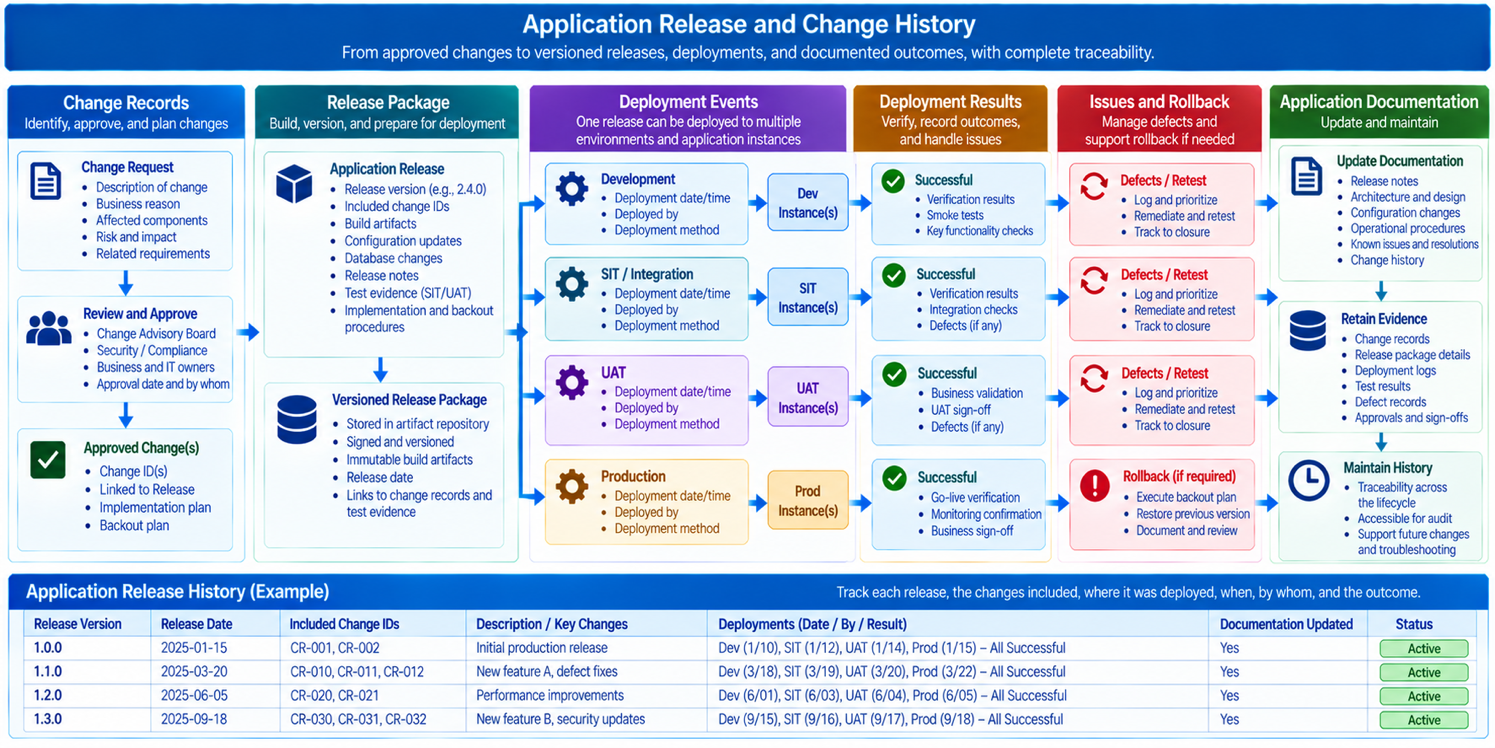
Record, for every Release and every other change to the Application or its Instances, such as an emergency fix, a configuration change, or a vendor upgrade:
An identifier and version.
What changed, including the requirements, Enhancement Requests, and Defects addressed.
Why it changed.
When it was deployed, and to which Instances.
Who made, reviewed, and approved it, and under which approval, including any exceptions granted.
The documentation updated as part of the change.
Publish Release Notes for Users and Support
For each Release, publish Release Notes in language suited to their audience: for users, what has changed in what they see and do; for Operations and Support, what has changed in how the Application behaves, is operated, or is supported, together with known issues and workarounds. Release Notes summarize a Release’s entries in the Release and Change History for the people it most directly affects.
Maintain and Share the History
Keep the Release and Change History in the Release and Deployment section of the Application Documentation, or in the enterprise’s Release and change management records, linked from the documentation. Extend it with every change, and never rewrite past entries; correct errors with new entries that reference the original ones. Publish Release Notes in the Digital Library and through the channels users and support teams already use.
Best Practice: Establish and Maintain the Application’s Release and Change History
It is a best practice to both establish and maintain the solution for an Application’s history of change: record every Release and other change, with what, why, when, where, who, and under what approval, and publish Release Notes for users and support teams with every Release.
Benefits: A complete Release and Change History answers “what changed?” immediately during incidents, cutting diagnosis time dramatically. It also provides the evidence of controlled change that auditors require, and Release Notes ensure that users and support teams are prepared for each Release rather than surprised by it.
Connections to Related IF4IT Practices and Inventories
The Release Management Best Practices addresses Releases, versions, and their governance in depth. The Service Management Best Practices addresses change management processes that produce many of the records in the Change History.
How to cite this page
When referencing this page in academic work, internal standards, or external publications, include the page title, IF4IT as author and publisher (The International Foundation for Information Technology (IF4IT), LLC), the URL, and your access date.
Example (informal web citation):
The International Foundation for Information Technology (IF4IT), LLC. Establish and Maintain the Application's Release and Change History | Application Management Best Practices. https://if4it.org/best-practices/application-management-best-practices/establish-and-maintain-the-application-s-release-and-change-history/ (accessed 2026-10-31).
See About Us for content governance and site-wide citation guidance.
Copyright for The International Foundation for Information Technology (IF4IT), LLC: 2008 - Present
Legal Disclaimers