Track the Application's Expiring Dependencies — Certificates, Credentials, Licenses, and Vendor Support Dates - Application Management Best Practices
Track the Application's Expiring Dependencies — Certificates, Credentials, Licenses, and Vendor Support Dates
(Chapter 109 of Application Management Best Practices)
Executive Summary: Chapter Overview
IF4ITThe Bottom Line
Core Concepts
| Concept | Definition & Strategic Role |
|---|---|
| Expiring Dependency | A dependency with a built-in end date, such as a certificate, a credential or other Security Secret with a rotation date, a license or subscription, a vendor support or end-of-life date, or an AI model deprecation date. Its expiry is entirely predictable, yet frequently goes unwatched. |
| Renewal Lead Time | The time needed to renew or replace an expiring dependency before it lapses, recorded together with its date, owner, and impact. Reminders and alerts are scheduled far enough ahead of each date to allow for this lead time, so renewal is never a last-minute scramble. |
| Expiring Dependencies List | A single list in the Application Documentation of all expiring dependencies with their dates, owners, lead times, and impacts, reviewable at a glance. Reviewed with every Release and at regular intervals, it also gives leaders early warning of renewal costs and end-of-support upgrades. |
Quick Q&A
Question: If certificate and license expiry dates are known in advance, why do they still cause outages?
Question: How does the tracking of expiring dependencies mature from Crawl to Run?
Read More Below
This chapter explains how to track dependencies that expire on known dates, so that their expiry never causes an outage or a lapse in support.
Why Expiring Dependencies Need Active Tracking
Some dependencies come with a built-in end date: certificates expire, credentials must be rotated, licenses and subscriptions lapse, vendor support ends, and AI models are deprecated by their providers. Each of these is entirely predictable, yet expired certificates and lapsed licenses remain a common cause of avoidable outages. The problem is rarely that the date is unknown; it is that no one is watching it.
Establish Tracking of Expiring Dependencies
Identify every expiring dependency of the Application: certificates, credentials and other Security Secrets with rotation dates, licenses and subscriptions, vendor support and end-of-life dates for technologies, and AI model deprecation dates.
Record, for each, its expiry or renewal date, its owner, the lead time needed to renew or replace it, and the impact if it lapses.
Establish reminders or alerts well ahead of each date, allowing for the lead time.
Establish who acts on each reminder, and how renewal or replacement is confirmed.
Document and Share Expiring Dependencies
Record expiring dependencies, with their dates, owners, lead times, and impacts, in a single list in the Application Documentation, so that they can be reviewed at a glance. Review the list with every Release and at a regular interval in between.
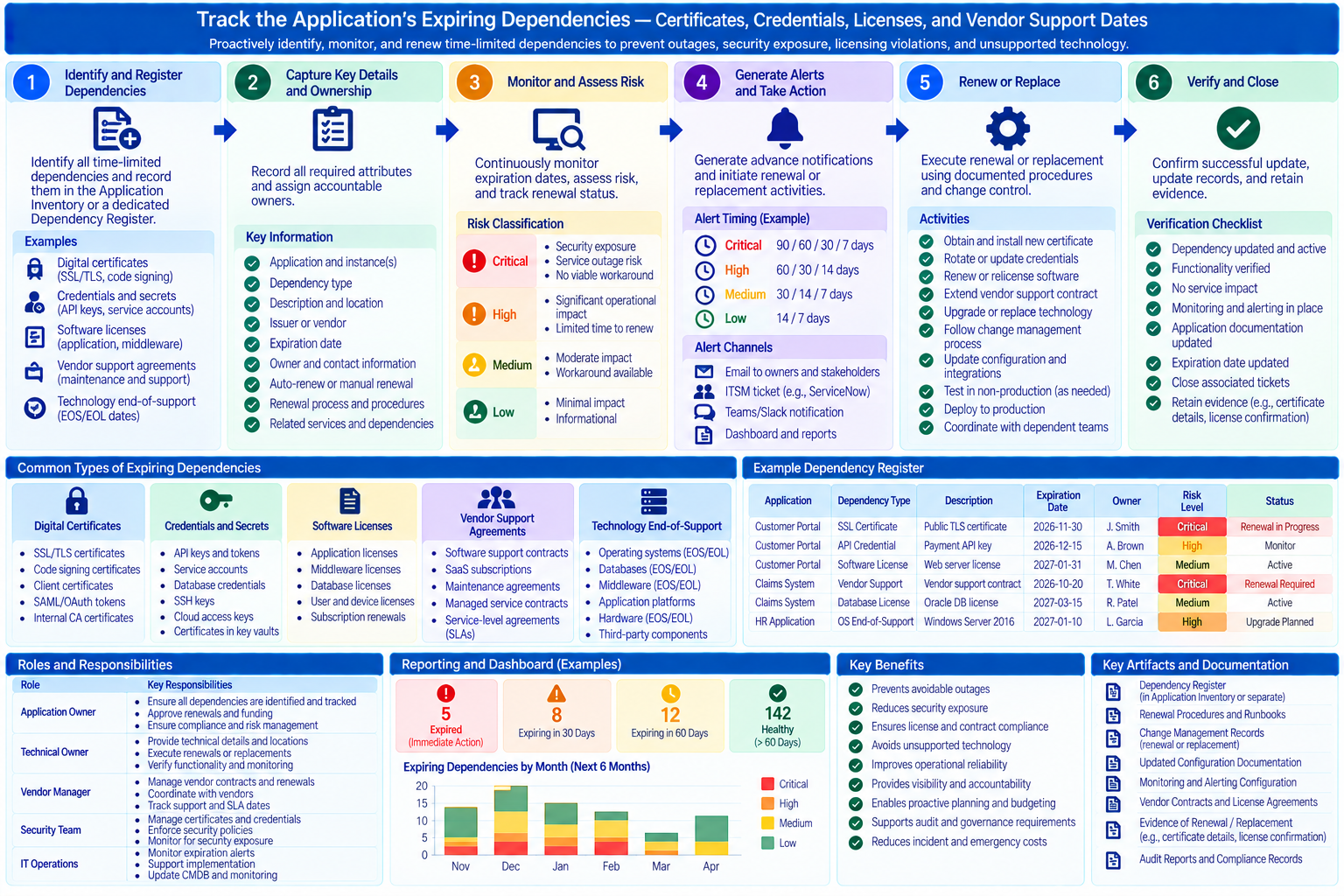
Best Practice: Track the Application’s Expiring Dependencies
It is a best practice to both establish and document the solution for predictable expiries: list every certificate, credential, license, subscription, support date, and model deprecation the Application depends on, with dates, owners, lead times, and impacts, and set reminders well ahead of each.
Benefits: Tracking expiring dependencies converts one of the most common causes of avoidable outages into routine, scheduled work. A single list also gives leaders early warning of upcoming renewal costs and end-of-support upgrades.
Advance Maturity Deliberately: Crawl, Walk, Run
Crawl. Expiring dependencies are listed manually in the Application Documentation with their dates and owners, and reviewed with every Release.
Walk. Reminders are scheduled automatically ahead of each date, and renewals are tracked to confirmation.
Run. Expiry dates are discovered and updated automatically from certificate, secrets, license, and technology records, and renewals or rotations are automated wherever possible.
Connections to Related IF4IT Practices and Inventories
The Application Portfolio Management (APM) Best Practices addresses tracking license renewal dates proactively. The Technology Portfolio Management (TPM) Best Practices addresses technology lifecycle and end-of-support dates.
How to cite this page
When referencing this page in academic work, internal standards, or external publications, include the page title, IF4IT as author and publisher (The International Foundation for Information Technology (IF4IT), LLC), the URL, and your access date.
Example (informal web citation):
The International Foundation for Information Technology (IF4IT), LLC. Track the Application's Expiring Dependencies — Certificates, Credentials, Licenses, and Vendor Support Dates | Application Management Best Practices. https://if4it.org/best-practices/application-management-best-practices/track-the-application-s-expiring-dependencies-certificates-credentials-licenses-and-vendor-support-dates/ (accessed 2026-10-31).
See About Us for content governance and site-wide citation guidance.
Copyright for The International Foundation for Information Technology (IF4IT), LLC: 2008 - Present
Legal Disclaimers